Manage Your Token Portfolio
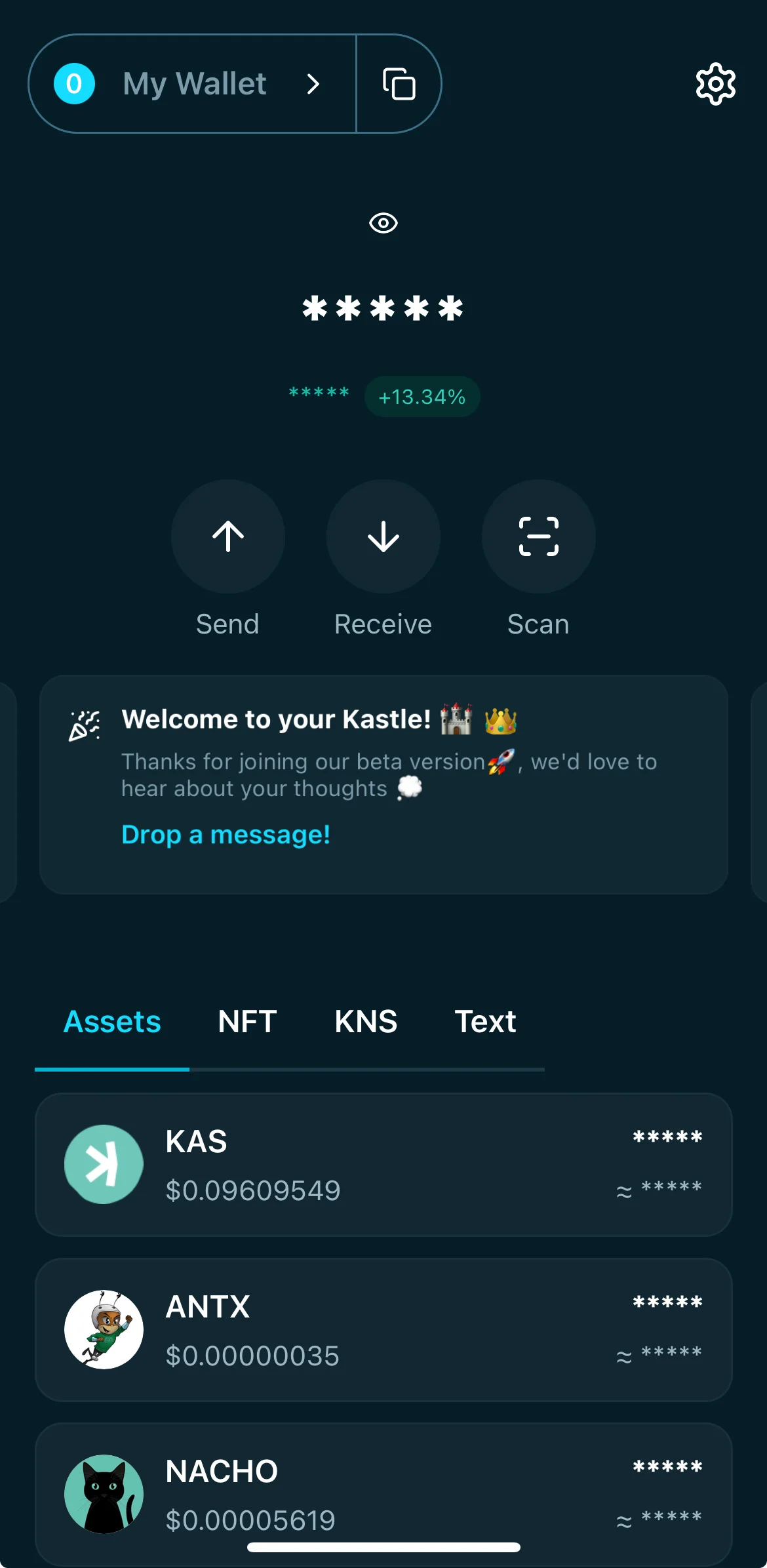
- Each asset in your portfolio can be managed by the related category you can access from the dashboard.
- There are 4 navigation tabs you can explore:
- Assets: View and manage your KAS and KRC20 tokens.
- NFT: A dedicated space for any supported NFTs in your wallet.
- KNS: See your registered Kaspa Name Service domains.
- Text: Browse or manage on-chain text inscriptions you own.
Assets
In the assets category, each token entry shows:
- Token Name and Logo
- Market Price (in your preferred currency equivalent)
- Masked Balance: Your token holdings are hidden by default.
- Approximate Value: An estimated FIAT equivalent for your token balance.
Tap any token to view more details, including transaction history.
Token Details
🔎 Understanding Token Info
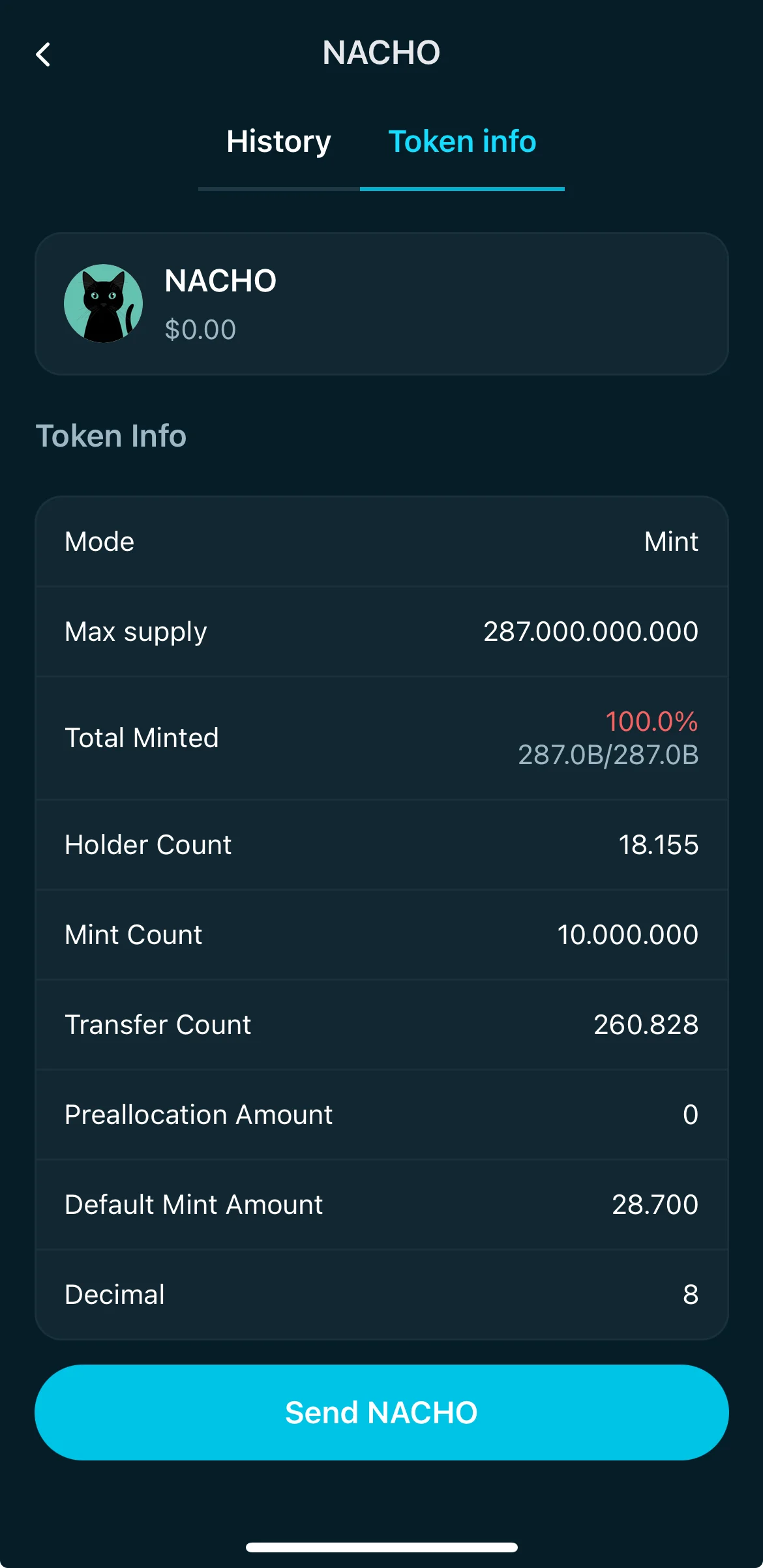
When you tap on a token in your portfolio (like “NACHO”), you can access its Token Info tab — a detailed breakdown of that token's metadata, supply, and others. Here's what each field means:
- Mode
- Indicates the token's type. For example, Mint means the token was created with a minting mechanism, where new tokens can be issued up to a defined max supply.
- Max Supply
- The total number of tokens that can ever exist. In this example, 287 billion NACHO tokens were defined as the maximum possible supply.
- Total Minted
- Shows how many tokens have already been minted versus the max supply. If it displays 100%, it means the total supply has been fully minted.
- Holder Count
- The number of unique addresses that currently hold this token. This helps you gauge how widely the token is distributed.
- Mint Count
- How many times the minting action has been performed across the token’s lifetime.
- Transfer Count
- The total number of times the token has been transferred between wallets.
- Preallocation Amount
- The number of tokens reserved at creation but not distributed through minting. A value of 0 means no tokens were preallocated.
- Default Mint Amount
- The standard quantity minted per mint action unless otherwise specified. In this case, every mint action typically produced 28.7 tokens.
- Decimal
- Defines the number of decimal places the token can be divided into. For example, 8 decimals means the token can be split into 0.00000001 units — just like Bitcoin.
At the bottom, you'll also find a Send [TOKEN] button that lets you transfer the token directly from this view.
History
$KAS
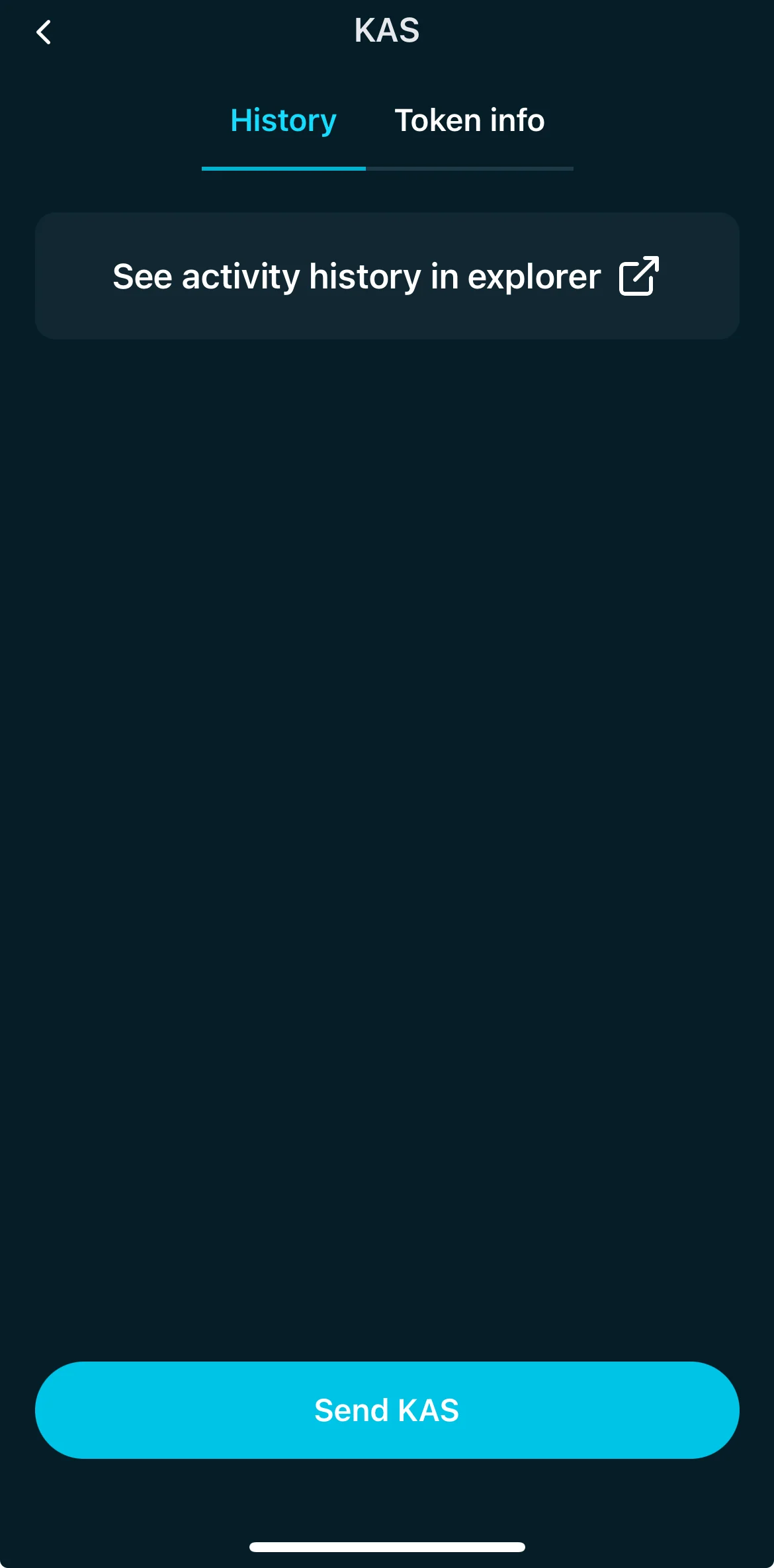
Here on the history page you can access to the Kaspa block explorer to check your transaction. Tapping on the "See your activity" button will automatically redirect to the explorer page showing your wallet's activities.
KRC20
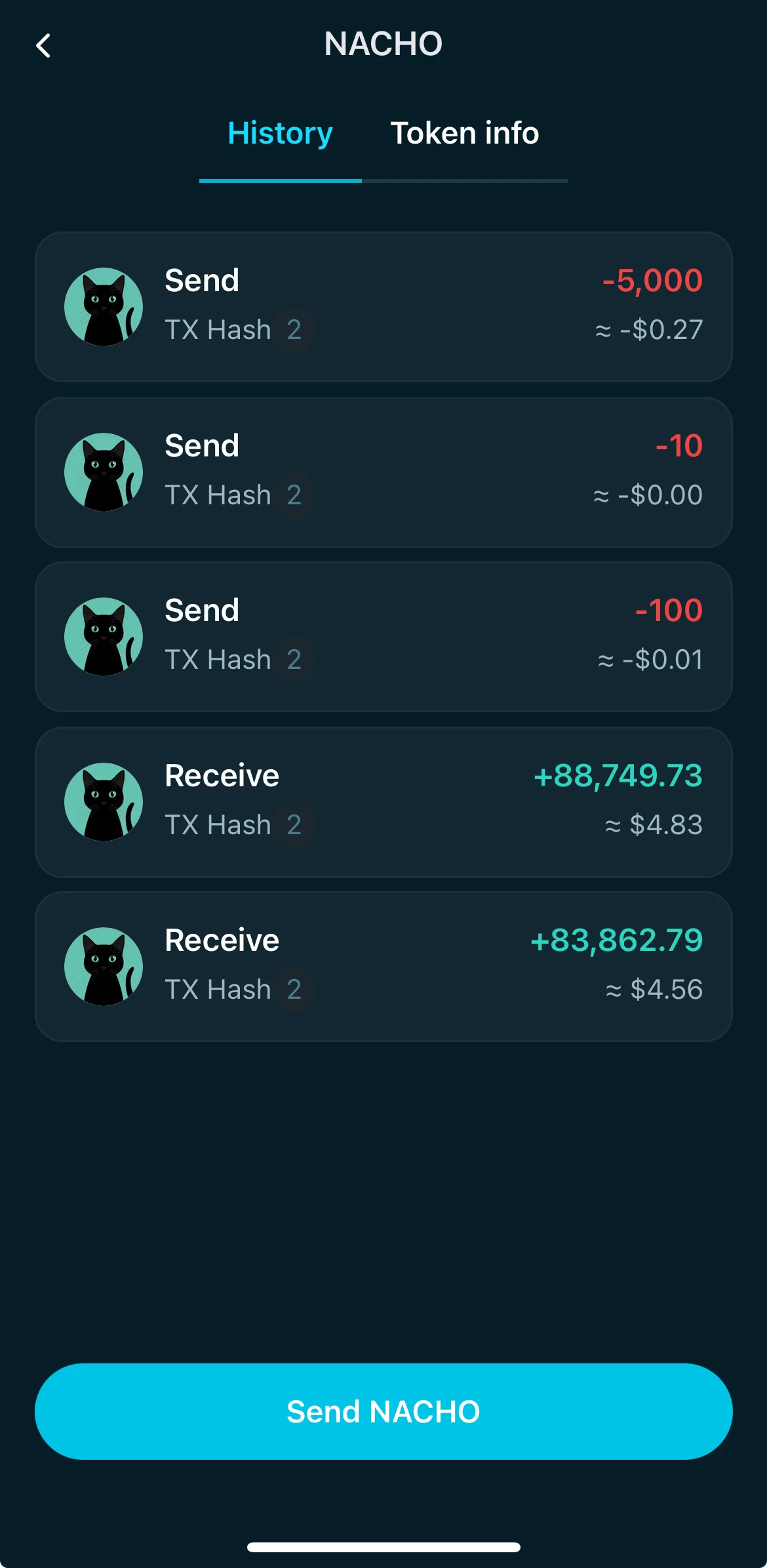
Here on the history page you can see all the recent activities for a specific KRC20. Nacho in the example below.
Manage Your Token Portfolio
- Each asset in your portfolio can be managed by the related category you can access from the dashboard.
- There are 4 navigation tabs you can explore:
- Assets: View and manage your KAS and KRC20 tokens.
- NFT: A dedicated space for any supported NFTs in your wallet.
- KNS: See your registered Kaspa Name Service domains.
- Text: Browse or manage on-chain text inscriptions you own.
Assets
In the assets category, each token entry shows:
- Token Name and Logo
- Market Price (in your preferred currency equivalent)
- Masked Balance: Your token holdings are hidden by default.
- Approximate Value: An estimated FIAT equivalent for your token balance.
Tap any token to view more details, including transaction history.
Token Details
🔎 Understanding Token Info
When you tap on a token in your portfolio (like “NACHO”), you can access its Token Info tab — a detailed breakdown of that token's metadata, supply, and others. Here's what each field means:
- Mode
- Indicates the token's type. For example, Mint means the token was created with a minting mechanism, where new tokens can be issued up to a defined max supply.
- Max Supply
- The total number of tokens that can ever exist. In this example, 287 billion NACHO tokens were defined as the maximum possible supply.
- Total Minted
- Shows how many tokens have already been minted versus the max supply. If it displays 100%, it means the total supply has been fully minted.
- Holder Count
- The number of unique addresses that currently hold this token. This helps you gauge how widely the token is distributed.
- Mint Count
- How many times the minting action has been performed across the token’s lifetime.
- Transfer Count
- The total number of times the token has been transferred between wallets.
- Preallocation Amount
- The number of tokens reserved at creation but not distributed through minting. A value of 0 means no tokens were preallocated.
- Default Mint Amount
- The standard quantity minted per mint action unless otherwise specified. In this case, every mint action typically produced 28.7 tokens.
- Decimal
- Defines the number of decimal places the token can be divided into. For example, 8 decimals means the token can be split into 0.00000001 units — just like Bitcoin.
At the bottom, you'll also find a Send [TOKEN] button that lets you transfer the token directly from this view.
History
$KAS
Here on the history page you can access to the Kaspa block explorer to check your transaction. Tapping on the "See your activity" button will automatically redirect to the explorer page showing your wallet's activities.
KRC20
Here on the history page you can see all the recent activities for a specific KRC20. Nacho in the example below.
Manage Your Token Portfolio
- Each asset in your portfolio can be managed by the related category you can access from the dashboard.
- There are 4 navigation tabs you can explore:
- Assets: View and manage your KAS and KRC20 tokens.
- NFT: A dedicated space for any supported NFTs in your wallet.
- KNS: See your registered Kaspa Name Service domains.
- Text: Browse or manage on-chain text inscriptions you own.
Assets
In the assets category, each token entry shows:
- Token Name and Logo
- Market Price (in your preferred currency equivalent)
- Masked Balance: Your token holdings are hidden by default.
- Approximate Value: An estimated FIAT equivalent for your token balance.
Tap any token to view more details, including transaction history.
Token Details
🔎 Understanding Token Info
When you tap on a token in your portfolio (like “NACHO”), you can access its Token Info tab — a detailed breakdown of that token's metadata, supply, and others. Here's what each field means:
- Mode
- Indicates the token's type. For example, Mint means the token was created with a minting mechanism, where new tokens can be issued up to a defined max supply.
- Max Supply
- The total number of tokens that can ever exist. In this example, 287 billion NACHO tokens were defined as the maximum possible supply.
- Total Minted
- Shows how many tokens have already been minted versus the max supply. If it displays 100%, it means the total supply has been fully minted.
- Holder Count
- The number of unique addresses that currently hold this token. This helps you gauge how widely the token is distributed.
- Mint Count
- How many times the minting action has been performed across the token’s lifetime.
- Transfer Count
- The total number of times the token has been transferred between wallets.
- Preallocation Amount
- The number of tokens reserved at creation but not distributed through minting. A value of 0 means no tokens were preallocated.
- Default Mint Amount
- The standard quantity minted per mint action unless otherwise specified. In this case, every mint action typically produced 28.7 tokens.
- Decimal
- Defines the number of decimal places the token can be divided into. For example, 8 decimals means the token can be split into 0.00000001 units — just like Bitcoin.
At the bottom, you'll also find a Send [TOKEN] button that lets you transfer the token directly from this view.
History
$KAS
Here on the history page you can access to the Kaspa block explorer to check your transaction. Tapping on the "See your activity" button will automatically redirect to the explorer page showing your wallet's activities.
KRC20
Here on the history page you can see all the recent activities for a specific KRC20. Nacho in the example below.