Navigate the Kastle Interface
This dashboard is designed to make managing your crypto assets as easy and secure as possible — all while keeping your data private and organized.
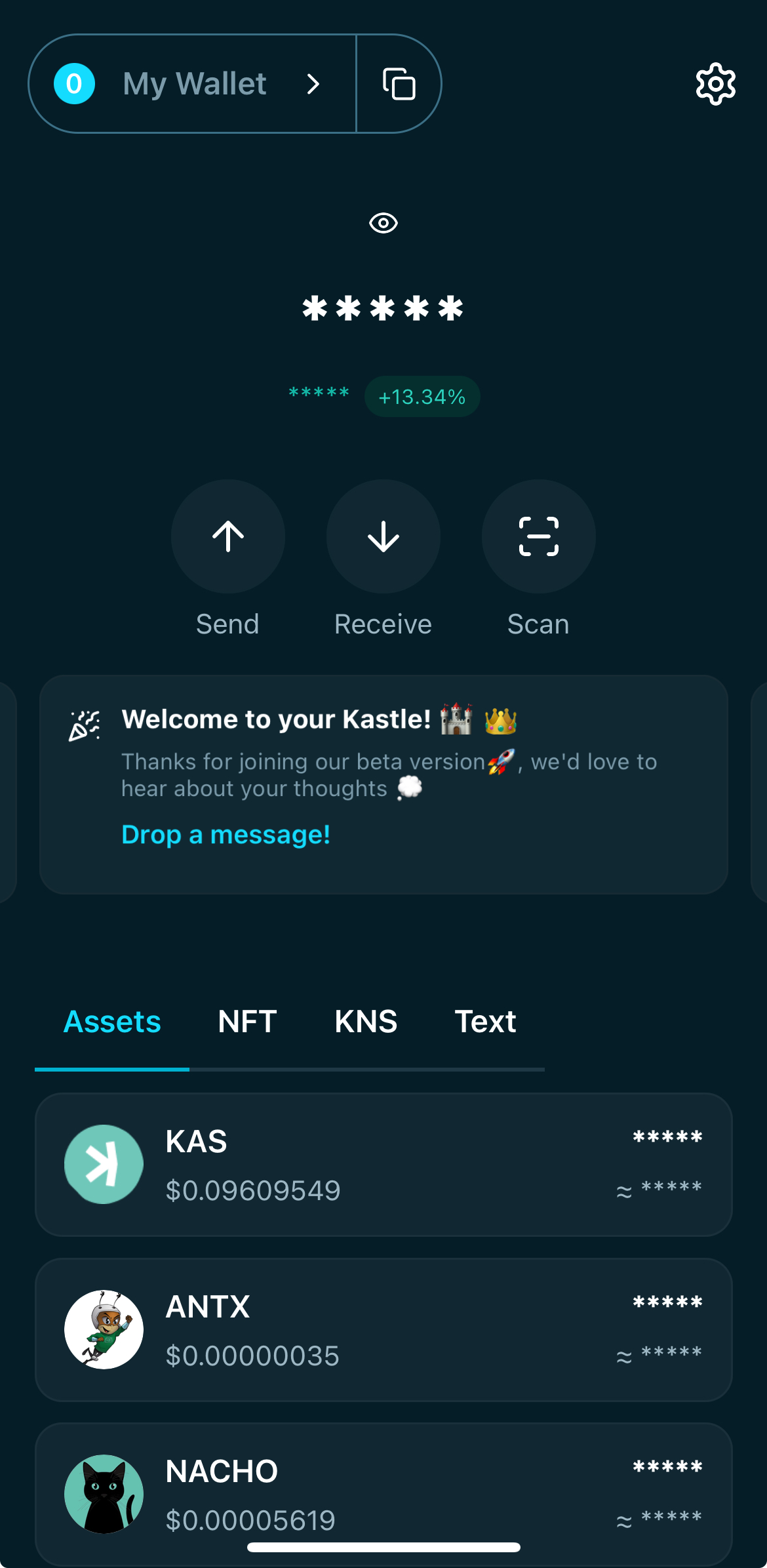
Top Bar
- Wallet Selector ("My Wallet"): Tap this to manage your wallets and wallets addresses. Inside the 'Wallets' page you can:
- Rename your wallet category and your wallet address;
- Switch between wallets and wallets addresses;
- Create or import wallets.
- Copy Button: Use this button to instantly copy your wallet's address;
- Settings (⚙️ icon): Access your wallet preferences, security options, and account settings.
Balance Overview
- Eye Icon (👁): Tap to show or hide your total wallet balance for privacy.
- Masked Balance + % Change: Your overall token balance is hidden by default. Next to it, you'll see the 24h percentage change in portfolio value.
Quick Action Buttons
- Send: Transfer KAS, KRC20 or ERC20 tokens to another address.
- Receive: Get your wallet address and QR code to receive funds.
- Scan: Use your camera to scan a QR code for faster sending.
Banner Section
- Banner messages: This section provides Kastle updates, messages, sponsored content from partners.
Navigation Tabs
- Assets: View and manage your KAS, KRC20, ERC20 tokens.
- NFT: A dedicated space for any supported NFTs in your wallet.
- KNS: See your registered Kaspa Name Service domains.
- Text: Browse or manage on-chain text inscriptions you own.
Token List
Each token entry shows:
- Token Name and Logo
- Market Price (in your preferred currency equivalent)
- Masked Balance: Your token holdings are hidden by default.
- Approximate Value: An estimated FIAT equivalent for your token balance.
Tap any token to view more details, including transaction history.
Navigate the Kastle Interface
This dashboard is designed to make managing your crypto assets as easy and secure as possible — all while keeping your data private and organized.
Top Bar
- Wallet Selector ("My Wallet"): Tap this to manage your wallets and wallets addresses. Inside the 'Wallets' page you can:
- Rename your wallet category and your wallet address;
- Switch between wallets and wallets addresses;
- Create or import wallets.
- Copy Button: Use this button to instantly copy your wallet's address;
- Settings (⚙️ icon): Access your wallet preferences, security options, and account settings.
Balance Overview
- Eye Icon (👁): Tap to show or hide your total wallet balance for privacy.
- Masked Balance + % Change: Your overall token balance is hidden by default. Next to it, you'll see the 24h percentage change in portfolio value.
Quick Action Buttons
- Send: Transfer KAS, KRC20 or ERC20 tokens to another address.
- Receive: Get your wallet address and QR code to receive funds.
- Scan: Use your camera to scan a QR code for faster sending.
Banner Section
- Banner messages: This section provides Kastle updates, messages, sponsored content from partners.
Navigation Tabs
- Assets: View and manage your KAS, KRC20, ERC20 tokens.
- NFT: A dedicated space for any supported NFTs in your wallet.
- KNS: See your registered Kaspa Name Service domains.
- Text: Browse or manage on-chain text inscriptions you own.
Token List
Each token entry shows:
- Token Name and Logo
- Market Price (in your preferred currency equivalent)
- Masked Balance: Your token holdings are hidden by default.
- Approximate Value: An estimated FIAT equivalent for your token balance.
Tap any token to view more details, including transaction history.
Navigate the Kastle Interface
This dashboard is designed to make managing your crypto assets as easy and secure as possible — all while keeping your data private and organized.
Top Bar
- Wallet Selector ("My Wallet"): Tap this to manage your wallets and wallets addresses. Inside the 'Wallets' page you can:
- Rename your wallet category and your wallet address;
- Switch between wallets and wallets addresses;
- Create or import wallets.
- Copy Button: Use this button to instantly copy your wallet's address;
- Settings (⚙️ icon): Access your wallet preferences, security options, and account settings.
Balance Overview
- Eye Icon (👁): Tap to show or hide your total wallet balance for privacy.
- Masked Balance + % Change: Your overall token balance is hidden by default. Next to it, you'll see the 24h percentage change in portfolio value.
Quick Action Buttons
- Send: Transfer KAS, KRC20 or ERC20 tokens to another address.
- Receive: Get your wallet address and QR code to receive funds.
- Scan: Use your camera to scan a QR code for faster sending.
Banner Section
- Banner messages: This section provides Kastle updates, messages, sponsored content from partners.
Navigation Tabs
- Assets: View and manage your KAS, KRC20, ERC20 tokens.
- NFT: A dedicated space for any supported NFTs in your wallet.
- KNS: See your registered Kaspa Name Service domains.
- Text: Browse or manage on-chain text inscriptions you own.
Token List
Each token entry shows:
- Token Name and Logo
- Market Price (in your preferred currency equivalent)
- Masked Balance: Your token holdings are hidden by default.
- Approximate Value: An estimated FIAT equivalent for your token balance.
Tap any token to view more details, including transaction history.